pdfcpu
PDF tooling for Go and the command line.
View the Project on GitHub pdfcpu/pdfcpu
Changelog
Future Directions
Contributing
Security Policy
Add Boxes
This command adds specific page boundaries for selected pages.
Media Box is mandatory and serves as default/parent box for Crop Box.
Crop Box serves as default/parent box for Art Box, Bleed Box and Trim Box.
Have a look at some examples .
Usage
pdfcpu boxes add description inFile [ outFile ] [flags]
Flags
| name | description | required |
|---|---|---|
| p(ages) | selected pages | no |
Common Flags
Arguments
| name | description | required |
|---|---|---|
| description | box configuration string | yes |
| inFile | PDF input file, use - to read from stdin | yes |
| outFile | PDF output file, use - to write to stdout | no |
Description
A string representation for a sequence of box definitions and assignments:
m(edia): {box}
 c(rop): {box}
  a(rt): {box} | m(edia) | c(rop) | b(leed) | t(rim)
b(leed): {box} | m(edia) | c(rop) | a(rt)   | t(rim)
 t(rim): {box} | m(edia) | c(rop) | a(rt)   | b(leed)
Examples
Given the following page with a sole media box represented by the rectangular region [0 0 400 600]:

Set a 200 x 200 Crop Box located in lower left corner of media box:
$ pdfcpu boxes add 'crop:[0 0 200 200]' in.pdf cropped.pdf
adding cropBox for in.pdf
writing cropped.pdf...
pages: all
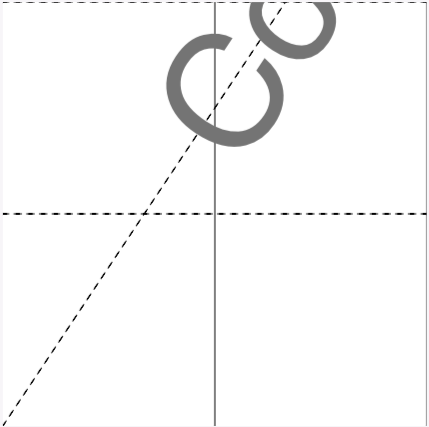
Using the crop command we can achieve the same:
$ pdfcpu crop '[0 0 200 200]' in.pdf cropped.pdf
cropping in.pdf
writing cropped.pdf...
pages: all
The following command sets an absolute Trim Box in user space and assigns it in turn to Bleed Box for page 2 only:
$ pdfcpu boxes add 'trim:[10 10 50 50], bleed:trim' in.pdf out.pdf --pages 2
adding trimBox, bleedBox for in.pdf
writing out.pdf...
Here we define a Crop Box for all pages in terms of a general margin of 1 inch within Media Box.
We also define a Bleed Box in terms of relative margins within Crop Box and assign it to Art Box and Trim Box:
$ pdfcpu boxes add 'c:1, b:15%, a:b, t:b' in.pdf out.pdf -u inches
adding cropBox, trimBox, bleedBox, artBox for test.pdf
writing out.pdf...
pages: all
Learn more about box description
Add page boundaries while reading the PDF from stdin:
$ aws s3 cp s3://acme-print/ad.pdf - \
   | pdfcpu boxes add 'trim:5, bleed:10' - - \
   | aws s3 cp - s3://acme-print/ad-boxes.pdf