pdfcpu

PDF tooling for Go and the command line.
View the Project on GitHub pdfcpu/pdfcpu
Changelog
Future Directions
Contributing
Security
Watermark
Add a watermark to selected pages of inFile. Have a look at some examples
.
Watermarks may be stacked on top of each other.
This allows for producing more complex page stamps - a mixture of text, images and foreign PDF page content.
Using description you can configure various aspects like position, offset, rotation, scaling and opacity. For text based watermarks you can also configure font name, font size, fill color and render mode.
WARNING
A watermark resides in the background of a page. How much of the watermark will be rendered visible on a page depends on the layers on top and the transparency involved. This applies to PDF in general. Eg. scanned PDF files usually consist of bitmap images spanning whole pages and will hide anything in the background including any watermark. For these cases use pdfcpu stamp with an opacity < 1 instead to get a similar result.
Usage
pdfcpu watermark add    string | file description inFile [ outFile ] [flags]
pdfcpu watermark update string | file description inFile [ outFile ] [flags]
pdfcpu watermark remove inFile [ outFile ] [flags]
NOTE
In the Adobe world a watermark is text or an image that appears either in front of or behind existing document content, unlike a stamp comment aka stamp annotation that anybody reading the PDF can open, edit, move around and delete. The difference here is that a watermark is integrated into a PDF page as a fixed element. Within pdfcpu the meaning of these terms is slightly different:
stampis any accumulated content that appears in front of the existing page content - sitting on top of everything else on a page at a fixed position.watermarkis any accumulated content that appears behind the existing page content - residing in the page background at a fixed position.
where content may be text, an image or a PDF page.
Flags
| flag | description | required |
|---|---|---|
| p(ages) | selected pages | no |
| m(ode) | text, image or pdf | yes |
Common Flags
Arguments
| name | description | required |
|---|---|---|
| string | display string | for text stamps |
| file | file name | for image or pdf stamps |
| description | configuration string | yes |
| inFile | PDF input file, use - to read from stdin | yes |
| outFile | PDF output file, use - to write to stdout | no |
Description
A configuration string to specify watermark parameters.
You may use parameter prefixes as long as the parameter can be identified.
eg. o: .7 is ambiguous because there is opacity and offset
but op: .7 will do the job.
| parameter | description | values | default |
|---|---|---|---|
| fontname | a basefont | Please refer to pdfcpu fonts list | Helvetica |
| scriptname | ISO-15924 code | Hans, Hant, Hira, Kana, Jpan, Hang, Kore | |
| points | fontsize in points | in combination with absolute scaling only | 24 |
| rtl | right to left userfont | on/off, true/false, t/f | off |
| position | the stamps lower left corner | anchors: tl, tc, tr, l, c, r, bl, bc, br | c |
| offset | (dx,dy) float vals in user units | eg. ‘15 20’ or ‘15.0 20.0’ | 0 0 |
| scalefactor | 0.0 < i <= 1.0 followed by optional abs or rel | 0.5 rel | |
| aligntext | horizontal text alignment | l..left, c..center, r..right, j..justified | c |
| strokecolor | for rendering text (see mode) | color | 0.5 0.5 0.5 = gray |
| fillcolor, color | for rendering text (see mode) | color | 0.5 0.5 0.5 = gray |
| backgroundcolor, bgcolor | bounding box background | color | none |
| rotation | rotation angle | -180.0 <= i <= 180.0 | 0.0 |
| diagonal | render along diagonal | 1 .. lower left to upper right | 1 |
| 2 .. upper left to lower right | |||
| opacity | 0.0 <= i <= 1.0 | 1 | |
| mode, rendermode | apply fill color | 0 .. fill | 0 |
| apply stroke color | 1 .. stroke | ||
| apply both fill & stroke color | 2 .. fill & stroke | ||
| margins | bounding box margins for text | i .. set all four margins | 0 |
| requires bgcolor | i j .. set t/b margins to i, set l/r margins to j | ||
| i j k .. set top to i, left/right to j, bot to k | |||
| i j k l .. set top, right, bottom, left margins | |||
| border | bounding box border for text | i {round} {color} | 0 |
| requires bccolor | i .. border width > 0 | ||
| round .. set round bounding box corners | |||
| color .. border color |
Only one of rotation and diagonal is allowed.
The following description parameters are for text based watermarks only:
- fontname
- scriptname (for CJK fonts if you want to avoid font embedding)
- points
- aligntext
- strokecolor
- fillcolor (=color)
- bgcolor
- rendermode
- margins
- border
- rtl (for user fonts only)
Anchors for positioning
| left | center | right | |
| top | tl | tc | tr |
l | c | r | |
| bottom | bl | bc | br |
Default description
'f:Helvetica, points:24, rtl:off, scale:0.5 rel, pos:c, off:0 0, align:c, fillc:#808080, strokec:#808080, rot:0, d:1, op:1, mo:0, margins:0, bo:0'
The default watermark configuration is:
- fixed center page position (for ‘free’ positioning use pos:bl)
- scale factor
0.5 relative to page dimensions - positive rotation along the diagonal from the lower left to the upper right page corner (
d:1). - fully opaque watermark by defining
opacity1
In addition for text based watermarks:
- font name
Helvetica - font size
24points - align:
c - stroke color gray (
0.5 0.5 0.5) - fill color gray (
0.5 0.5 0.5) - no background color and therefore no bounding box
- render mode fill (
mo:0) - margins
0 - border
0 - rtl
off
You only have to specify parameters that differ from the default.
Examples
Text Based Watermarks
Create a watermark using defaults only:
$ pdfcpu watermark add 'This is a watermark' '' in.pdf out.pdf --mode text

Create a watermark using scale factor 1:
$ pdfcpu watermark add --mode text -- 'This is a watermark' 'scale:1' in.pdf out.pdf


Create a watermark along the second diagonal using scale factor 0.9, default render mode fill and a fill color:
$ pdfcpu watermark add 'This is a watermark' 'scale:.9, d:2, c:.6 .2 .9' in.pdf out.pdf -m text

Create a watermark with 0 degree rotation using scale factor 0.9 and render mode stroke:
$ pdfcpu watermark add 'This is a watermark' 'scale:.9, rot:0, mo:1' in.pdf out.pdf --mode text

Create a watermark with a counterclockwise rotation of 45 degrees using scale factor 1, render mode fill & stroke and a fill color:
$ pdfcpu watermark add 'This is a watermark' 'scale:1, rot:45, mo:2, c:.2 .7 .9' in.pdf out.pdf --mode text

Create a watermark using some multi line text, show its bounding box by setting bgcol, set all margins to 5 and a border width of 7 rendering round corners.
$ pdfcpu watermark add 'Some multi\nline text' 'margins:5, bo:7 round .3 .7 .7, fillc:#3277d3, bgcol:#beded9, rot:0' in.pdf out.pdf -m text

Create a watermark with default rotation, using scale factor 1, font size 48, default render mode fill, a fill color and set opacity to 0.6:
$ pdfcpu watermark add 'Draft' 'points:48, scale:1, color:.8 .8 .4, op:.6' in.pdf out.pdf --mode text

Let's assume we have a PDF where even pages are blank. We can add a watermark for theses pages saying "Intentionally left blank" like so:
$ pdfcpu watermark add 'Intentionally left blank' '' in.pdf out.pdf --mode text --pages even
We also could have used pdfcpu stamp. There is really no difference since we apply only to empty pages here.
Image Based Watermarks
Create a watermark using defaults only:
$ pdfcpu watermark add 'pic.jpg' '' in.pdf out.pdf -m image

Create a watermark using 0 degree rotation and relative scaling of 1.0:
$ pdfcpu watermark add 'pic.jpg' 'scale:1 rel, rot:0' in.pdf out.pdf --mode image

Create a watermark using 0 degree rotation and absolute scaling of 1.0:
$ pdfcpu watermark add 'pic.jpg' 'scale:1 abs, rot:0' in.pdf out.pdf -m image
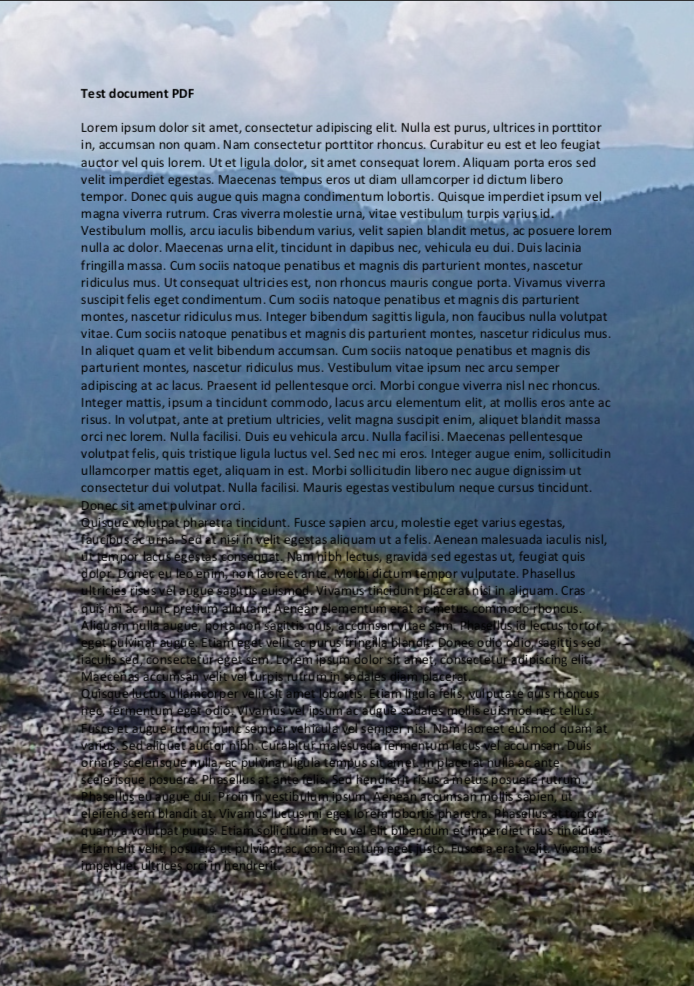
Create a watermark using a clockwise rotation of 30 degrees and absolute scaling of 1.0:
$ pdfcpu watermark add --mode image -- 'pic.jpg' 'rotation:-30, scalefactor:1 abs' in.pdf out.pdf

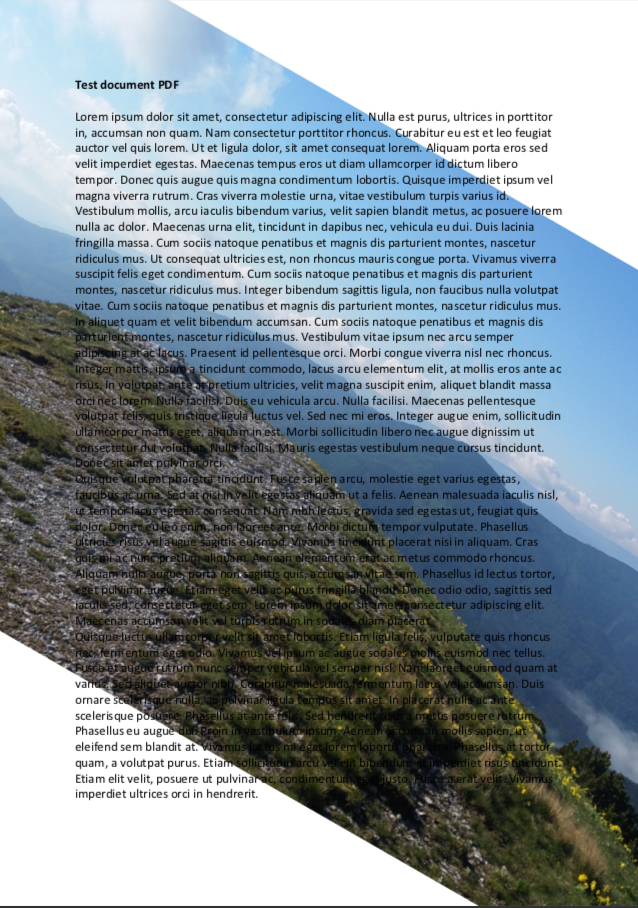
Create a watermark using a clockwise rotation of 30 degrees and absolute scaling of 0.25:
$ pdfcpu watermark add -m image -- 'pic.jpg' 'rot:-30, scale:.25 abs' in.pdf out.pdf
PDF Based Watermarks
Rotated pages in the watermark PDF keep their displayed orientation when pdfcpu sizes and positions them. You do not need to rotate the source PDF beforehand.
Create a watermark using defaults only. This will apply page 1 of some.pdf:
$ pdfcpu watermark add 'some.pdf:1' '' in.pdf out.pdf --mode pdf

This is how to create a watermark using defaults and page 2 of some.pdf:
$ pdfcpu watermark add 'some.pdf:2' '' in.pdf out.pdf -m pdf
Pipeline Example
Add a watermark to a streamed PDF and upload the result:
$ aws s3 cp s3://acme-dataroom/draft.pdf - \
   | pdfcpu watermark add "DRAFT" "diag:1, scale:.8 rel, op:.25" - - \
   | aws s3 cp - s3://acme-dataroom/draft-watermarked.pdf